Surround Sound Test: 5.1, 7.1 & Dolby Atmos Speaker Check
Content
Want to know if your Dolby Atmos system is wired correctly? Test every speaker on its own first. Demo trailers come after that, because a swapped channel barely stands out in a movie but is obvious in a channel test.
If you prefer full trailers over test tones, check the best YouTube Dolby Atmos demo trailers.
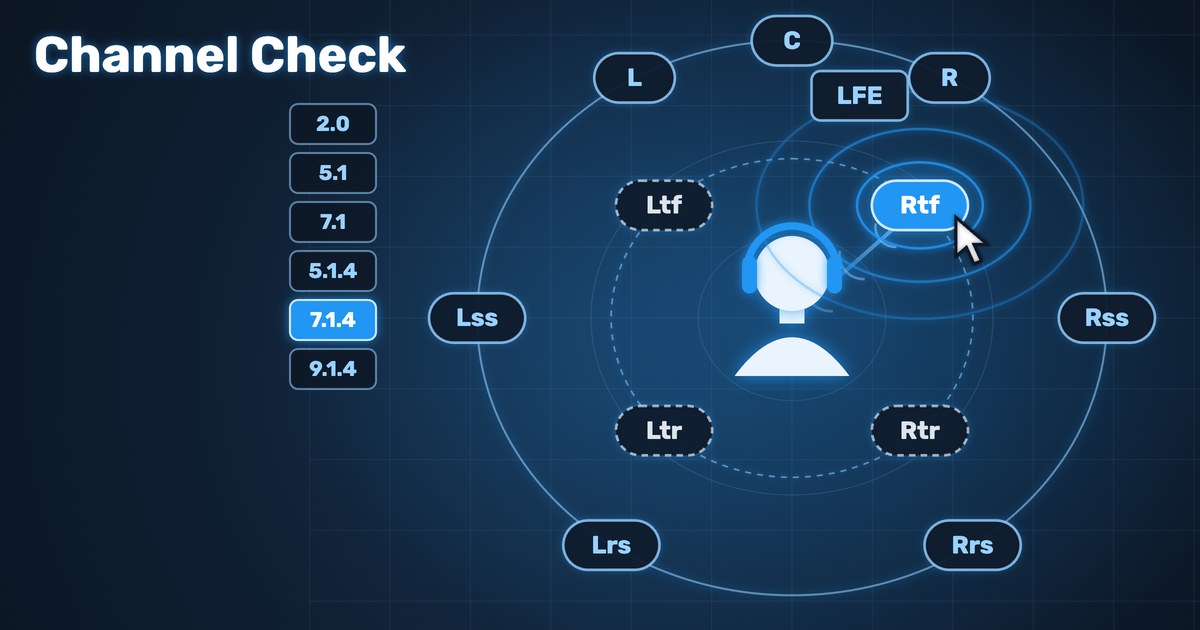
Test your speakers right here: pick your layout and click a speaker. A voice announces each channel, so you hear immediately whether it comes from the right place.
Surround Sound Test: The Most Important Facts at a Glance
- Test each channel on its own first: does “Front Left” really come from the front left?
- Soundbars create sides and height by bouncing sound off walls and ceiling. From behind this works poorly, because the sound has to bounce twice.
- On headphones you always hear a binaural stereo version, never your actual speaker channels.
Why test Dolby Atmos?

Most problems are routing errors: side and rear speakers swapped, a height channel on the wrong receiver output, the center disabled in the menu. A movie hides this: the Atmos demos before a film swing the sound around front, back, left and right very obviously, but in the film itself you mostly notice Atmos only in action scenes. A channel test plays one speaker at a time and makes every mistake audible.
This happened to me. I bought an Atmos soundbar and got no Atmos. It took me a long time to find the problem: the HDMI cable and the port on my smart TV were too old, and the Netflix app never showed that it was playing plain surround sound instead of Dolby Atmos.
How to test each speaker individually
With the test at the top of this page you pick your layout and click a speaker. What happens depends on your device:
- Speaker mode: each announcement goes to exactly one output channel. This works when your browser outputs more than two channels, for example a PC connected to an AV receiver via HDMI (Windows set to 5.1 or 7.1) or a multichannel audio interface. With more than eight outputs, the height channels work too.
- Headphone mode: always two channels. The announcements are placed binaurally at each speaker position. This shows you how the layout is built, but it does not test your system.
Phones, laptop speakers and Bluetooth only output stereo in a browser. There you can only check left and right with speakers.
Test Tones for 5.1.2, 7.1.2 and 7.1.4
The numbers mean: ear-level speakers, subwoofer, height speakers.
- 5.1.2: left, right, center, subwoofer, two surrounds, two front heights
- 7.1.2: like 5.1, but with separate side and rear speakers, plus two heights
- 7.1.4: like 7.1, plus four heights (two front, two rear)
For every layout there is a channel check on my YouTube channel where a voice announces each channel. The videos use the open 3D audio format IAMF (Eclipsa Audio): on devices with Eclipsa support you hear the real channels, otherwise a stereo version. How I tested the format with my own 7.1.4 and Ambisonics files is in my IAMF immersive audio demo test.
All channel checks, from stereo to 9.1.6, are in this playlist:
Playing Dolby Atmos on a PC or soundbar
- Windows: the “Dolby Access” app from the Microsoft Store plays Dolby Atmos trailers. The PC has to be connected via HDMI directly to the AV receiver or soundbar.
- TV with soundbar: Atmos travels from the TV to the soundbar over HDMI ARC or eARC. An optical cable does not carry Atmos.
- Headphones: you always hear a binaural rendering. That is not a speaker test.
Common Mistakes When Testing

- Side and rear swapped: Windows orders 7.1 channels differently from movies. Check the channel assignment in your receiver.
- Old HDMI cable or TV port: then you only get surround, not Atmos. Streaming apps don’t necessarily tell you.
- Rear doesn’t sound like rear: a soundbar plays sides and height via reflections off walls and ceiling. For sound from behind it has to bounce twice, which is why soundbars often come bundled with two rear speakers. When buying, check how many drivers are built in: 5.1.2 or even 9.1.6.
- Subwoofer stays silent: the LFE channel only plays what is on that channel in the material. Check that a subwoofer is enabled in your receiver.
- Center too quiet: calibrate levels in the receiver, ideally with the automatic room calibration and its microphone.
Frequently Asked Questions
Why should I test my Dolby Atmos system?
Because swapped or silent channels barely stand out in movies. A channel test shows within a minute whether every speaker is connected correctly.
Where can I find Dolby Atmos test tones?
At the top of this page you can play each channel directly in your browser. Channel checks for all common layouts are on my YouTube channel.
Can I test Dolby Atmos with headphones?
Only the layout, not your system. Headphones always get two channels, height is simulated binaurally. In every common format the loudspeaker is the reference and the binaural version is just a downmix of it.
How do I play Dolby Atmos on a PC?
With the “Dolby Access” app on Windows and an HDMI connection directly to the AV receiver or soundbar.
Back to the BlogLet’s talk about your project
Want to use 3D audio in a real project, not just understand it in theory?
Get in touch →